
BEFORE WE BEGAN
OVERVIEW
The online grocery shopping app GroceryStop provides customers with a dependable substitute for the hectic and crowded store environment. Creating a subscription model for a grocery delivery app to keep track of the frequently used/needed items is the focus of this case study.
EXPLORING ANSWERS
DESIGN PROCESS

DEFINING THE ISSUE
PROBLEM STATEMENT
Shopping at a mart or store is a time-consuming process and not finding the items in one place is another problem. Having to go to the supermarkets every other week may not be possible for a lot of people along with that keeping track of items they've run out of.
Due to a busy schedule, it's difficult to find time to go to the store to buy groceries as it becomes a tiring experience.
.png)
EXPLORING ANSWERS
SOLUTION
To create an online app for the users where they can buy groceries and subscribe to their regularly required products. Users can set the subscription period as per their convince and get it delivered within 5 hours of order, without having to carry heavy grocery bags around making their experience faster, more efficient and super convenient and ordering from anywhere they want.
PRIMARY RESEARCH
INTERVIEW QUESTIONS
-
Please let us know a little about yourself.
-
How does your day normally starts?
-
Due to your busy schedule how do you manage the time to stop groceries?
-
How do you normally buy groceries?
-
What challenges/problems do you feel while shopping from a shop or store?
-
What are your thoughts on online groceries shopping?
-
Have you tried it before?
-
How was your experience with online groceries shopping?
-
There are a lot of grocery items we regularly need, and having to order it at a regular period frustrates you?
-
What do you feel about subscription grocery model?
-
What are your expectations from the such app?
UNDERSTANDING USER
PERSONA


STORYTELLING
USER STORY
-
As a health-conscious working woman, Naina wants fresh and healthy food delivered to her home on time so that she sticks to her good diet and save time for her hobbies and office work.
-
As a homemaker, Vaishnavi who suffers from a few health conditions wants to make sure she gets fresh and good quality groceries in the room so that she doesn't have to go grocery shopping by herself.
.png)
STORYTELLING
USER JOURNEY

ANAYLSING MARKET
COMPETITIVE ANALYSIS


STRUCTURING CONTENT
INFORMATION ARCHITECTURE &
TASK FLOW


CONTENT LAYOUT
WIREFRAMES
SOLUTION
VISUALS

LOGIN
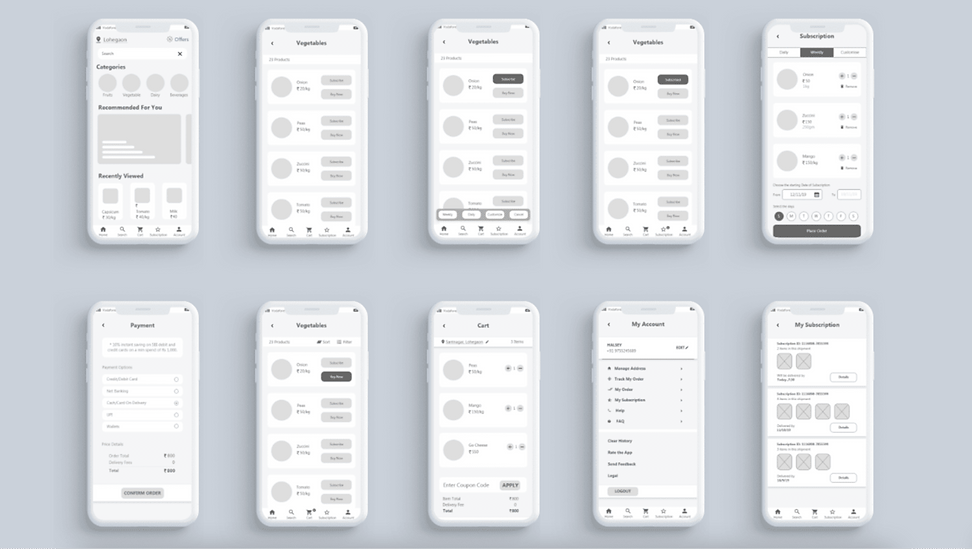
The flow starts with the user signing up if a first-time user or login in if an account is already created on the grocery stop. Or users can simply sign up via social media too.
HOME PAGES
As user logs in, they’ll will reach home page, where they can explore various categories to shop, or find any particular item via the search. The application asks for location permission to the user which allows to show best products available in the area.

CATEGORY PAGE
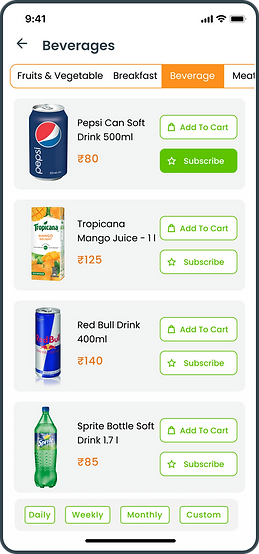
Here user will can select a category which allows them to see categories of items. Here they can add order products via "Add to Cart" or by "Subscribing". Subscribing to a product will allow user to get that item delivered at a defined interval of time.
PRODUCT DETAILS
This page tells the user all the details to the user, the price, discount, quantity, what the product contains etc.
And also recommends users other similar products they may be interested in.

MY CART
As the user as added all the items in the cart now they proceed to checkout. Here user gets to see the list of added items and get to choose when they want the delivery.
For payment user gets several options like card, UPI payment or pay on delivery.

MY SUBSCRIPTION
Similar to the cart page, where user buys items that they need once, we have another way to place order- via Subscription as the name suggests user can subscribe to items/products that they need on regular bases.
They can set the frequency to daily, weekly, monthly or customize it.

MY ORDER
Users can see the details of their order here. They can stop or put the subscription on pause when needed or even edit it like by changing the quantity or removing or adding a new item.

